Secware_Tech6
Administrators
-
Joined
-
Last visited
Everything posted by Secware_Tech6
-
Those different freq are for different countries. We only stock the UK model. Im there was a volume order we could order them in, but we have a minimum order and the uk market for other freq would be very limited.
-
Both valid points. I wouldnt advise putting more than 1 detector on a zone.
-
I would suggest you have programmed the codes incrorrectly somehow. You can default the codes. If you check the manaul it will tell you how. Alternativly if you let me know your order number ill send the procedure to your account email. Tech
-
my recommendation is to use a galaxy wireless system. But brown wireless contacts are not as available as white. Are the pir's to be wired?
-
Yes the bellbox is totally wire free. It used lithuim cells as a power source.
-
Yes you can. You will just need ot get the correct perephierals to suit.
-
You will need to take an output from the panel. What inputs doe you have to trigger the shutter, id assume the shutter is designed to be held open by the fire alarm normally. I would suggest you use the aux fire output on the panel. What panel is it?
-
what sort of lighting is at the scene. And is the system expected to function with direct headlights etc?
-
What is the unit at the other end? ie it depends on what system you have installed.
-
you 'could' do it this way but id suggest its a problematic way. A better way would be to use a 240v relay and connect this to the incoming supply. When that opened it could open your gates straight away. If you would like a delay then id add a timer to hold off the relay.
-
I would suggest you try again. Also check your spam folders etc and add securitywarehouse.co.uk to your safe senders list.
-
Let us know your account name and we will reset it manually and test.
-
The master blaster is purly a sounder. I would suggest a basic panel to control it. say a honeywell optima gen4, then a detector of your choice. Tech
-
Do you mean a wireles phone addition?
-
The powermax plus has 2 conventional zone input on the rear of the case, so yes you can.
-
i think you have an sd1 manual and you have an sd1+? you will need to enter the code rather than press / hold enter to get to the menu
-
as above id recommend a 16 ohm unit.
-
all our rf gear is 868 unless marked otherwise, ie 433 etc
-
The range should be fine, but wireless needs to be tested on site. Sounder wise id have a look at the honeywell ag6 or any of the texecom sounders
-
Sounds like you have a tamper on the bell, have you ensured all switches are closed?
-
an external warning? Well the simplest would be a mains relay from the light and an external sounder and power supply. But id recommend the gjd system, or an full control panel would be better. Depends on their budget and needs really.
-
you can send it back to us for replacement. You didnt remove the keypad frm the panel by mistake instead of the sounder did you?
-
its not 180 deg, i dont know of a single head pro unit that is. Its usually only the low qualioty stuff that is. but it is 12v, with adjustable times etc Have a look at the product page download the data sheet
-
12v dc? id so the only unit that will do 180 degs is the voltek twin head. But this doesnt have adjustable times etc. Apart from the opal elite (gjd) none have a programmable time this is usually done by the controller
-
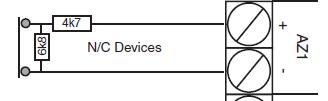
Try this It will be in ythe install manual for your panel too. You may need to alter the resistor values to match your panel.