Secware_Tech6
Administrators
-
Joined
-
Last visited
Everything posted by Secware_Tech6
-
Id do the mains first as its easier to connect that quickly, ie push fuse in. A clean power up is essential. Howver as soon as possible the nattery shoudl be connected. SOme panels need the battery to operate the protective device (ie the lower voltage fuse) if you have a wiring fault you can end up popping the panel with out the battery connected. To be 100% safe fully charge the battery from the panel with nothing connect to the pnale (other than the mains and the battery)
-
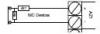
Please see attahced basic diagram
-
if you let us know your day mode and alarm currents i will do the calcs for you. Support
-
no its not available on the site. if you let us know the orderr number we will send you one. Support
-
id assume you havnt got the zones configured correctly how are they setup currently.
-
yes you right however you will need to tamper the other detectors
-
not a full alarm no
-
when say gsm speech dialler are wanting to transmit voice over it or alarm data?
-
what do you have a single device on a zone. and what is the eol configuration?
-
yes it is not connected. at either end. James
-
the new twinflex with asd is indeed an exicting product. however fike are currently predicting a 6 month delay until release of this product. lots of new features and a cracking new look. i really like it from a techy viewpoint. it also looks great
-
what sort of framerate per channel are you looking for? also you shouldnt be able to read native footage from a security machines hard drive for obvious reasons. my initial thoughts are to use ip cameras but you may have a specialist cam already in place. im also thinking you may be better of with some sort of upload /export rather than trying to view native footage.
-
id have a look at the logisty / daitem gear. We are currerntly putting a product through secware approval evaluation. this is dect based and totally wireless. there is also a video variant.
-
agreed. There are a few options, i would use a normal zone as this would activate the alarm when set. You could also use an led to show this externally to the unit
-
is it deffinetly an sd1+ what happens when you hold down the ent key?
-
You are correct Old sounders used to have their own +ve connection for the strobe. They now take the +ve form the HO+ (D in this case) James
-
Those are the instructions for the older system, that did require the programmer. The higher end panels do not include instructions but we can send them via the support system on request. I will send you the correct manaul. James
-
yes please. It sounds like they might be. COuld you also tell me which ones they are? James
-
Any DVR that uses a PAL output (ie bnc) is limited to 720x576 pixels. Also the lower end machines dont output a high quality output. Just cos a unit has hdmi and or vga outputs doesnt mean it will output it in any better quality. Usually they dont. The only machines i know off that output true high def etc are very high end units. I will however look into it. James
-
The domonial is a difficult panel to program. If you havnt had the training etc it will be a challenging excercise. However the old domonial did need a palm programmer. The new version (that we sell and comes with an lcd keypad) can be programmed with or without this programmer. Ensure you have the correct instructions for your keypad type. JAmes
-
ID recommend the menvier sd2 speech dialler http://www.securitywarehouse.co.uk/catalog/index.php?main_page=product_info&products_id=503 do you want fobs to arm and disarm or on an access system?
-
id agree the I-on is a fine panel, or the honeywell galaxy g2 starter kit
-
Yes it will but you cant mix biscuit type on the same line. you will need to add this expander to the premier panel http://www.securitywarehouse.co.uk/catalog/index.php?main_page=product_info&products_id=388
-
Only with the very latest version. I would say no as a general guide
-
We have added a bulk buy option for these batteries see http://www.securitywarehouse.co.uk/catalog/index.php?main_page=product_info&products_id=2223