Secware_Tech6
Administrators
-
Joined
-
Last visited
Everything posted by Secware_Tech6
-
The wiring for SAB's has not chnaged in some time. I dont know the 9200 but i would expect it to be fine. The thing to check is teh brand of bell.
-
Im not sure that risco make an orange lens, maybe its the red unit. If so you need a red backplate (XS3D) and an XS3D cover. The accenta's all support multiple outputs. ie you can trigger fire, pa, intruder on your dialler seperatly with the accenta. However the optima does not have these outputs. But you can wire the dialler trigger from the sounder output. This is fine if all you want to do is trigger the dialler everytime the sounder activates. Depends. You need to size the battery depending on the standby time required and system load. The compact units (optima and accenta) will only accept a 2.1-2.3 A/h battery. The Poly and metal versions will accept upto a 7A/h battery Not really. You need 6 cores for PIR's on a double pole panel such as the accenta / optima. You need a pair for power, a pair for alarm and a pair for tamper. While the system will function without a tamper circuit its not advisable as your detectors will not be protected when the alarm is disarmed. I have honeywell IS215's in my own house, does that help? Yes Tech Support
-
Well Yes and no The 402R is a low voltage sensor with space for a seperate radio transmitter So as it comes the answer is no. But if you add a universal transmitter to it (to suit the reciever) then yes. Tech Support
-
Ravi Id have to check the tech docs but from memory the excel has remote pc options and eol options. It used to be the excel was the lcd version. If you want me to have a good look re specs let me know. Also re the price. We should be cheaper as well as better value, are you saying we arnt? James
-
There are hard wired external PIR's that are suited to pet tolerant situations. eg Optex VX402 The Takex External Pet PIR and the risco watchout. Tech Support
-
The engineers manual are the same for all models of the optima/accenta range. Which one have you got? Also the AG6 manual does match the manual for the AG6. However the accenta/optima manual details the AG6 (older model) as having the ADE TADB connections. Unfortunatly the new AG6 does not have this marking. James
-
Not necessarily Ravi If there is a tamper alarm that cannot be reset due to the alarm still being present, then the unit will lick and not reset until the fault is cleared.
-
Might be best if you define 'best' Id say best was a VR DDA compliant BPT system but its certainly not cheap. Tech
-
Thats wrong im afraid AG6 ---- Optima R- ---- T V- ---- A ST ---- Strobe - V+ ---- D SW ---- B HOwever this wouldnt cause your symtoms. Its likly to be centred around the zone wiring either in the panel or at the sensors. Could you post pictures of each end?
-
Ravi as you know we have our price promise and have the lowest prices online. I will see if there is a little more but i belive there has been a price increase from scanny and as yet we havnt increased our prices inline with this. There have been a few manufactures lately that have announced price rises. re the prox unit. Its to do with volumes of units produced. This allows the manufacturer to make the higher volume parts at a lower cost. The optima outsells the easy set by approx 30:1 so that gives you some idea.
-
i would hope you havnt paid for the fitting if its not working! I agree with ravi sounds like its either not programmed, linked out or wired wrong. The led's on the sensor will turn on when the sensor activates. All this shows is that they have power. If he has not wired them into the panel correctly then they wont function as required.
-
The problem yu will have with parralel wiring is that the resistance will vary wildly as individual deviced open YOu are correct in your theory of parralel calcs but when both devices are openyou will have an approx 4k7 res. But the panel will see this as a problem as the resistance is too high to be closed yest too low for open. James
-
If you have concerns then you are correct do not attempt it yourself. I would call a pro in. They will be able to resolve the sab/scb issue easily. JAmes
-
Thanks for the follow up. will be very usefull. James
-
No dont swap the wires. you either need a relay or new bells. depending on the bells . if they are ok then keep them and invert the output with a relay. if they are not replace the bells.
-
John Wouldnt disagree the starter kit is good value Id however consider a dualtec for the garage. MOst of the basic panels will do as you need and the accenta is flexible for its price range. You might want to consider the metal or the poly version as the compact is a small unit with limited space inside the panel James
-
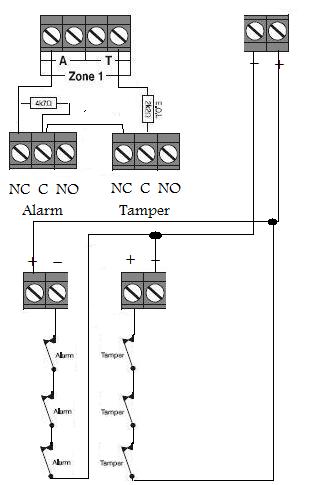
Attached is a quick drawing showing 2 relays
-
yes the circuit would go open circuit causing a tamper. The easy thing to remeber is that 2k2 = closed 6k9 = open (alarm) >7k = Tamper That is over simplified as there are high res and other monitoring in between, but will allow you to work it out. ANother way is to use double pole and series this up (using 6 cores per pir) Then use relay coils for each pole (ie tamper and alarm) but use a pos feed on the one circuit and a neg on the other to give short circiot protection. James TEch
-
YOu are right in most cases. ANd this is the case with the euro. Most modern panels have a common circuit neg as well as power neg. James
-
yes that will work but you wont have short circuit protection at the first device.
-
it could be either. but its probable its the sensor. Tech Support
-
As you have seen there is no secure way to wire fsl using this method. Its advised that you have one device per zone. You can use a 3 wire method and keep the 2k2 at the end of the line. This will give some protection.
-
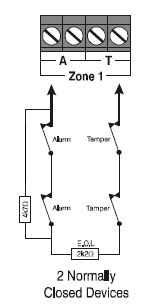
I have attached a drawing showing an example
-
Id be cautious here I think elaine has mixed up the question. Your talking about the AC side of the panel not the dc side. Generally the AC side of a panel is from 15-21v The only thing we could recommend is an official honeywell transformer, however if you do connect it, just check your regulator doesnt overheat. The reg will dissipate any excess voltage as heat. Tech SUpport
-
smash as above only a 2.1 - 2.3 A/h will fit inside a 9448 Tech Support