
Secware_Tech6
Administrators
-
Joined
-
Last visited
Everything posted by Secware_Tech6
-
Yes Its normal to power it down as if you cross a wire you can blow the board or a fuse. Bear in mind to the 9600 is gonna be around 30 yr old now
-
You will need to wire to the other 'T' connection to 12v- also. You do need a - tamper return
-
is pretty simplified?
-
12v - = Blue 12v + = Red Bell = Black STB = White Im assuming the 2 connections marked as T are a voltage input and output clean switch but not sure what bell you have. But they re the tamper return which on your old image is Yellow But you will need (id assume) a negative tamper return, this depends on the panel connecting to.
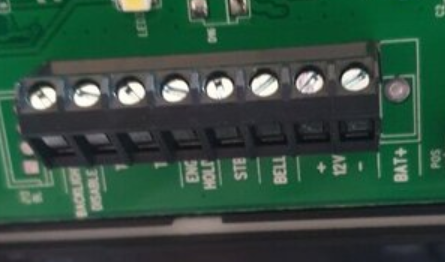
-
id also look at the room your protecting, location etc. If its a 9600 its an old double pole panel (very old) so doesnt need reistors. Optex FlipX FLX-P-ST Flexible Range Indoor PIR Detector [FLX-P-ST] - £16.34 : | Best Price Promise | Security Warehouse Professional products
-
is it just the tranmitter that has failed?
-
Are you wanting to send 2 hd images down the same coax? If so what resolution?
-
-
Is there an SNT that you can use for 2 Turbo/HD images if you are upgrading the analogue cameras to HD
-
Sorry I misunderstood this
-
upgrading equipment wont help if you have fundamental wiring issues Most 2 wire stuff has a 50m limit depending on cable
-
This is a windows .Net app as with all software test on your site before using. It works with ours and we use it daily SW-images.zip
-
We have decided to release this software we use in house. We use a heavily modified Zen Cart system for our platform. We have various tools that we use the hook into this platform and one of them is for the new product team. We use this application to upload images of the products and modify existing products etc. Ive created a quick video of it in action here The app is to ease uploading of images and pdf files. We use it internally. Using it you select your image as high res as possible, then select upload. The app can upload via SMB, FTP or just save to local machine. It saves in the zencart format to allow large, medium and small files and automatically names the images as required and in the correct folder. It also supports multiple images per product with auto upload. Other uses is upload of pdf's. We use this for the product datasheets. Buttons hopefully are obvious. It has been modified to allow others to use it for their zencarts. The browser button is just to allow tests of layout etc on product number. Any feedback or new features changes let us know, im sure if its useful to others it will be useful to us.
-
My initial concern is that BT cable isnt ideal for Video but OK for audio. Looking at your images it isnt cat5 cable. You me be better with a 2 wire system depending on the ranges involved I assume you have standard parallel audio (ie call is seperate but audio is common. If your having issues on that cable with audio only video and audio is highly probably to be an issue
-
Hi Eric What system do you have currently and how is is cabled / wired. ie what type and size of cables run where?
-
Looking to update current system with the Bell BS4 Bellissimo 4 Station Video System
-
Aspect L-TU-IP4M-Z-1 IP Camera Do you know default password? Will the camera stream in ONVIF mode, what decoding formats?
-
-
Hope you get to the bottom of it!
-
Screening your cables (without the earth connected screened cable is worse than non screened) is certainly your best starting point Ideally change 1 thing ata a time till you track it down. Intermittent faults are a pia to find
-
Correct Id drop it to like 50ms on all circuits and hopefully iy does it all the time. Then you can trackit down Or put it 800ms (highest alowed under the standards even though the panel will go slower) to see if it 'hides' the problem I would say it isnt an equipment problem id say its interference. rf etc Id be looking for RF noise but i dont know the site etc
-
they should all be connected to earth at 1 end only. So if you connect them all at the panel end only id suspect that will cure your issue. never connect both ends of a screen. ALso did you adjust the repsonse time of the circuits. The 16+ was an older slower panel so probably didnt notice
-
Hi, I want to make a quick enquiry with wifi jamming becoming more common would this affect visionic powermax pro kit
-
No worries How is it wired, ie type of cable used and how is it run, any other cables nearby to those runs. Screened cable is an option the other thing is to connect all spare cores to earth (at panel end only) to help
-
I was just wondering if the panel is close to current limit. From what your saying i dont think its incompatible sensors. Ive not seen what your experiencing other that with interference on the cables/damage or overloaded psu's If it were sensors being id expect it to happen often.