Secware_Tech6
Administrators
-
Joined
-
Last visited
Everything posted by Secware_Tech6
-
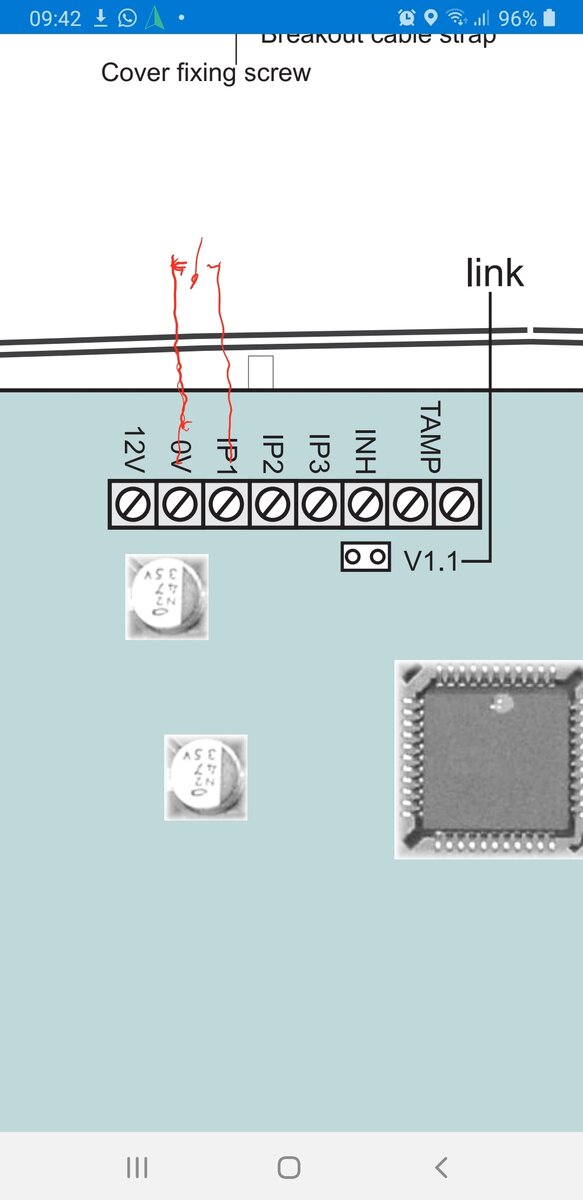
You will need to diagnose the issue, it could be a bad connection, failed pir or cable damage etc. What control panel do you have, maybe you could upload a picture of the panel connections?>
-
Initial points If you can cable you should. I would run cables to all detectors and more Any movement detector is best only detecting movement. Expecting a £30 device to tell the difference reliably between a pet and a person etc is asking for trouble. Yes they are sold as a feature but i would never recommend any of them for reliable catch performance and false alarm reliability You have to match keypads to control panels. I wouldnt recommend the texecom over say an spc or a dimension On the bigger panels you can connect upto 32 keypads depending on the panel specified Your installer will advise best on the equipment to use
-
You can use a voltek switcher but you will need a resistor to the s teminal and a switch input on the r terminal. however you could just use a relay with a 12v coil ie https://www.securitywarehouse.co.uk/catalog/access-control-c-27/access-control-ancillaries-c-27_43/tkc-very-handy-little-relay-p-5190.html
-
it is a speaker there is no adjustment on it. You should be able to adjust it at the panel/expander depending on what panel it is
-
If its in the area armed then it should activate. If using udl can you post the full program details I'll have a look
-
It's in the change zones menu
-
Unfortunately no camera with ir will work through a window at night due to ir reflection
-
-
-
-
The manual is assuming you are wiring to a transister output. As you are using relays thus is not in the manual. The input just requires a switched 0v. You can try this by using a short piece of wire and brrifly connecting from 0v to Input 1 if programmed correctly this will cause the unit to dial
-
-
-
-
-
Hi Ian. Screen printing requires a minimum order quantity depending on the manufacturer
-
The ex35r is just a sensor the rf transmitter is seperare and usually fitted behind the sensor.
-
You can but iirc the Id expander is no longer in production.
-
Unfortunately Id is the bus system your panel uses is obsolete. If your a pro installer hkc make a bus system compatible with your wiring. If you have all 9 devices daisy chained then you can't use an eol type panel but if you have 8 core you can run 3 powered devices on each cable. Depends on the wiring
-
the sd1+ iirc is a 12v device. Is it running on something else?
-
I've not tested that combination but you will require a standalone compatible tx fir the visonic. The beam is just the detector for connecting to a standalone tx
-
No reason why it wouldn't work, but I'd use the viper glx sensors, nice adjustment on the shock level
-
I'd look into the hkc range But use something like the cqr sensa as you will need a wired ball for backlit
-
I would only advise 1 device per zone but if latching you can have more
-
the spk input is just that. its not a switched input connection. You need to use the spk connection on the panel. However on that panel i would use a dedicated 16 Ohm speaker rather than a combined. If using a combined use something with a low and a high input and use outputs instead of speaker