

Secware_Tech6
Administrators
-
Joined
-
Last visited
Everything posted by Secware_Tech6
-
Rashid We have various User Manuals Available for free download from the store. The 9448 is currently listed. If you need additional manuals not listed please either note it in the forum as a request or email us at technical. Tech Support
-
Hi Baxall have now ceased trading but the baxall zt4 is a long obsolete part. What is it your controlling? It might be better to look at a bbv part as this should work (depending on your telemetry reciever) or a DM digital sprite. Your options are fairly limited due to using an up the coax FSK telemetry. If you can provide more details we will probably be able to suggest an alternative. Tech Support
-
Yes we can do that but you need to email sales and give them your vat number. Once this is verified to match your account we will then issue you a unique code to enter during checkout that will rate all your orders at 0% vat. Tech Support
-
Martin Yes we can supply to sweden, if you continue through the process as normal the system will calculate your shipping costs depending upon the items ordered.
-
Yes as above if used ona fire door it must have a fail safe means of opening the door in the event of a fire. This could be a breakglass or the 'yale' if fitted
-
Geoff While changing VCR's is not a difficult task Id still advise you contact an engineer or your installer. There were a few digital vcr replacements (ie the vista solo etc) but these have been phased out now due to lack of demand, as most vhs based systems have either been replaced with digital, or continuing for whatever reason with analogue. Also the cost now of multi input dvr's has dropped considerably. DVD's were never really used for security due to the very short recording time and the technology not being as flexible as tape. Hard disk based Digital Video Recorders have taken over now. Id advise you have a look at the DM or DM ECO range of recorders.
-
Helmut. Risco keep very tight control of the software for their control panels and as such its only available to registered installers direct form risco. Scantronic have a similar policy. Texecom lead the way in software availabilty and you might want to consider using wintex and texecom wireless equipment instead. Im sure this position will change in the future but currently we can only provide software to registered installers for the above control panels.
-
Scantronic are a manufacturer not an installer. If you currently dont have a contract on your system then id advise you find a local nsi gold approved company in your area. www.nsi.org.uk Alternatively one of our installers in your area may reply to your post.
-
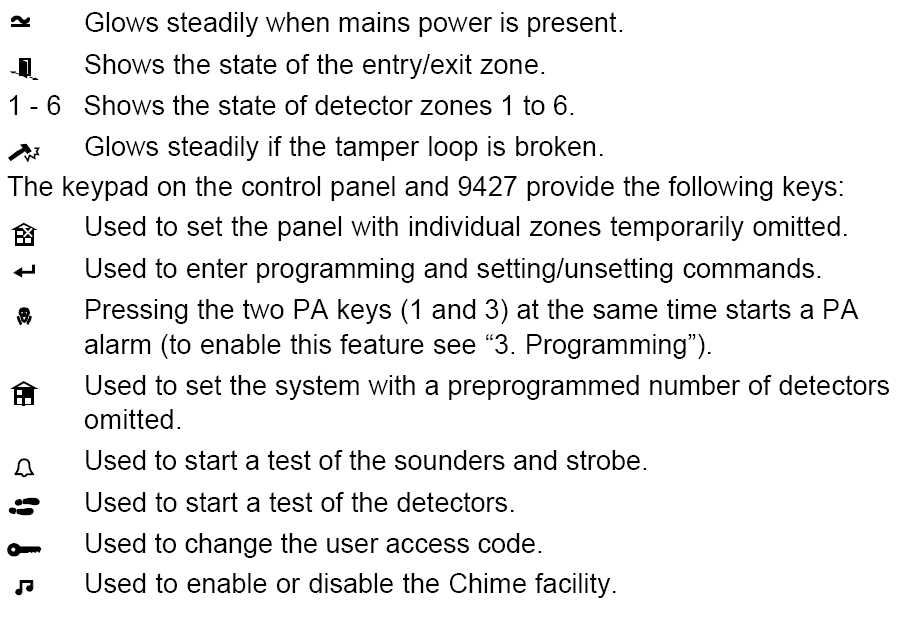
The 9427 is a keypad that usually connects to a 9448 control panel. The 9448 is a basic Scantronic Intruder Alarm Panel. It may have smoke detectors etc wired into it but it is not a fire alarm. We have User manuals for all popular control panels on the site, currently available as a free download. If the manual you require isnt there then drop an email to technical@securitywarehouse.co.uk and we will endeavour to add it. The user manual will provide basic operation notes etc. I have attached a brief explanation of the Icons / images on the keypad below.
-
Micheal we have various installers in london that may be able to help and they will reply here or pm you. Alternativly have a look at nsi.org.uk and find a local NSI Gold installer in your area.
-
Pringles The multispeech can run any 16Ohm speaker, so yes it can be used in an internal environment with conventional speakers, but it can also be connected to horn speakers and they can be used outside. If using a few speaker / horns you will need a seperate amplifier to run these and connect the putput from the multispeech to the amplifier. Most external speakers are designed for '100v' line pa amplifiers if connecting a horn directly to the multispeech ensure that you have one that has a 16 or 8 ohm setting.
-
Vishal The panel is reporting that it has 'exit faults' during setting. This means that detectors are activating as you leave the protected area and is normal. The panel is letting you know for example that a door is open and not all ok. It should then change back to normal as you vacate the area, You then know the alarm is setting fine.
-
The restriction on battery size on this panel and the optima is due to the physical size restriction as its a 'compact' enclosure. The charging circuit is capreble of using a bigger battery but this will not fit in the case. Any 1.9-2.4 A/h battery should have the same physical dimensions and so will fit.
-
Craig Tech Support is open throughout the break but the warehouse is running on minimal staff during the shutdown period. Orders are being taken and are being processed but normal service will resume on the 3rd of January
-
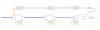
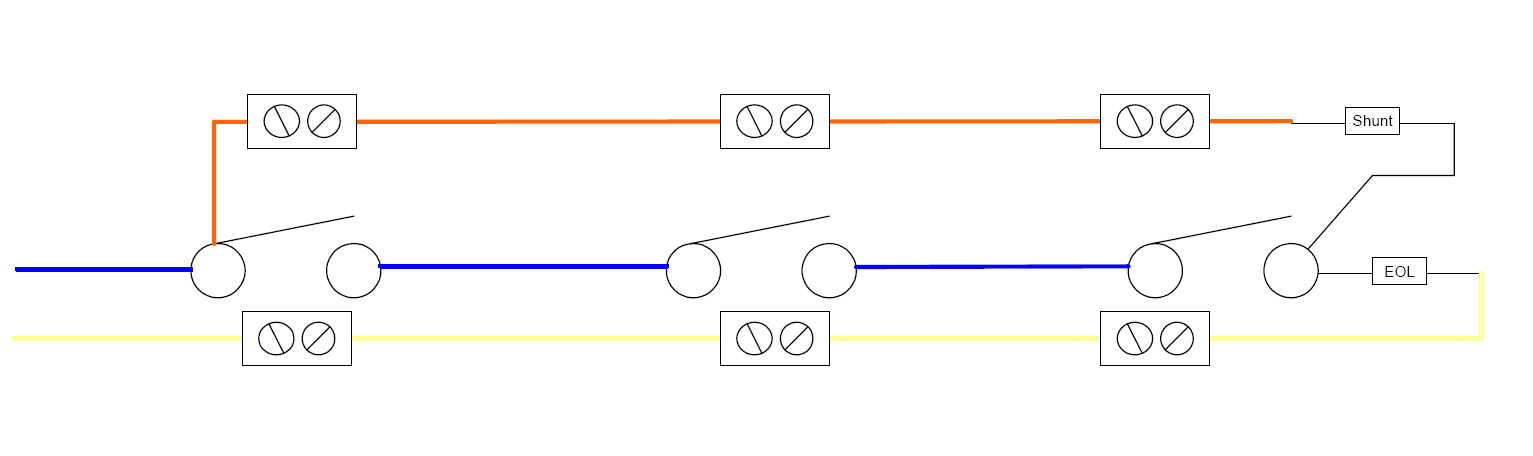
The best way is not to wire multiple devices per zone but dedicate each device to its own zone. Zones can then be 'grouped' into separate areas for part setting etc. But if required for double doors etc then see the attached diagram.
-
Barry I assume you have checked there is good signal in the area you have fitted the dialler and it is not located inside a metal panel? If not then it sounds like you might have a faulty unit. If you believe you have a faulty one please contact us at technical@securitywarehouse.co.uk, we will then authorise an rma number and returns will contact you to swap it. Tech
-
Geoff, I would recommend the ACT prox keypads for your application. The compact is programmed using shadow cards and you need to keep a duplicate of every card / tag that is issued. The act system uses the keypad for programming so deleting a lost card is a simple as entering the user number to be deleted. This will also save in the long term as you dont need to buy 2 cards (user and shadow) for every user. The act 5 system has a limit of 50 users though, if this isnt enough have a look at the smart2 1080. The 1080 has the advantage of being able to network with upto 8 other doors and connect to a pc at a later date. Tech
-
Paul Yes those units are compatible, and you can add additional floodlights to the system as required. The buzzer will activate at all times but the lights will not come on if its daylight if the night sensor has been adjusted. Tech
-
Dave The recommended placement for sensors does depend on the sensor, but generalising a fair bit, you shouldnt have detectors pointed towards windows or above heat sources. Real fires should also be avoided. Id advise mounting your sensors looking into the room. Sensor placement can only be decided during the risk assesment, ie the designer needs to assess the risk of all rooms, if the study is 3 stories up and has no external access then its unlikly it requires a sensor, but the groundfloor study most probably will. Depending upon ease of access and value in the room will decide if that area requires a sensor. Its usual in a house for example that you would protect the all ground floor rooms, and all 1st floor rooms + with easy access (ie flat roofs). That usually means all downstairs rooms and the landing.
-
Please register for a login for the Forum at http://www.securitywarehouse.co.uk/forums/index.php?action=register You will then have access to post questions. To post a new question, navigate to the area you wish to post your question and select the 'new topic' button towards the top right of the screen. Give the post a relvant title and enter your question / comment in the main area and press 'Post' Any questions then just email us at technical@securitywarehouse.co.uk
-
Daan If your using a geovision system for your recording then an upgrade and an ANPR option might be ideal. http://www.securitywarehouse.co.uk/catalog/index.php?main_page=product_info&products_id=1359
-

Important Information
By using this site, you agree to our Terms of Use.