
All Activity
Past hour
-
Residents judge their access system by what happens during everyday situations. One of the most common is delivery. A grocery order arrives. A package driver reaches the gate. A restaurant delivery needs access. When everything works, the process may feel effortless. When something goes wrong, the resident immediately notices. https://www.youtube.com/watch?v=XpTvI8vwBXQ That is why the resident delivery experience should be part of the community's access-control strategy. Better Delivery Access Starts with a Defined ProcessA strong delivery process should answer: How does the driver identify the destination? What information does the gate review? When is resident confirmation required? What happens when the resident is unavailable? How are unexpected drivers handled? What requires escalation? ASIS International notes that effective visitor management depends on the interaction of technology, policies, and procedures. It also reports that visitor management is one of the more challenging components of access control because organizations deal with many different temporary visitor categories. ASIS International ASIS International — Getting Visitor Management Right in Access Control A delivery workflow should therefore be treated as an operational process, not just a gate-opening event. Virtual Gate Guard Adds Live SupportVirtual Gate Guard can provide live remote communication through compatible gate technology. Depending on the property's approved procedures, Safe Passage Solutions remote attendants may: Communicate with the driver Confirm the stated destination Review available access information Follow approved resident instructions Contact designated parties Apply defined exception procedures Escalate unresolved requests This can be especially useful when the automated or resident-confirmation process does not provide enough information. The Resident Should Not Have to Solve Every Gate ProblemResidents should still participate in access decisions when the property requires it. However, the resident should not necessarily have to troubleshoot every operational problem at the entrance. For example: A driver arrives in another vehicle The visitor record contains slightly different information A recurring provider sends another employee A delivery arrives during a different time window A resident misses the first call A documented exception process can give the gate another path. Visitor Management Helps Organize Expected ArrivalsVisitor Management can provide the information needed to support routine delivery handling. Depending on the property setup, it may contain: Resident destination Visitor or vendor name Expected arrival Service provider Approved contact Access instructions ASIS research involving 1,022 respondents found that visitor management was a recurring access-control concern and that organizations integrating visitor-management solutions with access-control technology expressed greater confidence in overall effectiveness. This research involved broader organizational environments, so it should not be treated as a direct measurement of HOA performance, but it supports the general value of integrated visitor information. ASIS International Consistency Shapes the Resident ExperienceImagine the same resident ordering food three times. The first driver reaches the home. The second leaves the food at the entrance. The third waits while the resident contacts property management. That inconsistency can make the access system feel unreliable even when the technology itself is working. A more consistent process may look like: Expected arrival → review current information → follow approved procedure If something changes: Exception → Virtual Gate Guard interaction → approved resolution or escalation Consistency does not mean every driver receives the same outcome. It means similar situations follow the same process. Keep Delivery Procedures Property-SpecificThe Foundation for Community Association Research notes that community-security planning is not one-size-fits-all. A high-rise condominium, large master-planned development, and small residential association may require very different security and access approaches. Community Association Research Foundation for Community Association Research — Community Security Best Practices The same is true for deliveries. A property should consider: Community size Number of gates Visitor volume Delivery frequency Available gate technology After-hours needs Resident expectations Give Common Delivery Situations a Defined PathResident Delivery Scenario Possible Process Expected delivery and resident responds Normal confirmation Expected delivery with current visitor record Follow applicable property procedure Resident does not respond Virtual Gate Guard exception process Changed driver or vehicle Review available information After-hours delivery After-hours procedure Authorization remains unclear Escalation This gives residents and property managers a more predictable access framework. Current Authorization Still MattersA familiar delivery company should not automatically replace current authorization. The same company may: Send another driver Use another vehicle Deliver to another resident Arrive outside the normal schedule NIST's physical-access guidance emphasizes verification of authorization before entry. The guidance applies to organizational facilities rather than HOAs, but the principle remains useful for residential access planning. NIST Computer Security Resource Center NIST SP 800-53 Rev. 5 The practical lesson is simple: Familiarity can provide context, but current authorization should drive the process. Review Delivery Complaints for Process GapsRecurring resident complaints can reveal weaknesses in the workflow. Property teams can review whether residents frequently report: Drivers unable to enter Packages left near the gate Food arriving late Repeated resident calls Different handling by different shifts Confusion over after-hours access If the same issue appears repeatedly, the solution may not be another piece of technology. It may be a clearer procedure. Frequently Asked QuestionsHow can Virtual Gate Guard improve the resident delivery experience?It can provide live communication when the normal access process reaches an exception and follow the community's approved procedures. Does this remove the resident from the process?No. Resident involvement depends on the property's authorization rules. Can Visitor Management support food and package deliveries?It can support expected arrival information where the property's system and procedures allow it. Does a familiar delivery company automatically receive access?Not necessarily. The property should follow its current authorization process. Can a better workflow guarantee every delivery reaches the home?No. Driver behavior, authorization, property procedures, and other conditions still affect delivery outcomes. Key TakeawaysResident delivery experience depends on what happens at the gate. Virtual Gate Guard can add live support when normal access reaches an exception. Visitor Management can provide useful context for expected arrivals. Residents should not have to troubleshoot every gate exception themselves. Consistent procedures can make delivery access easier to understand. Familiarity should not replace current authorization. Delivery procedures should reflect each property's actual needs. Final ThoughtsThe best resident delivery experience is not simply the fastest one. It is the one where residents understand what will happen when a delivery reaches the gate. Routine deliveries should have a clear process. Exceptions should have another clear process. And unresolved requests should have a defined escalation path. Virtual Gate Guard can support that structure by providing live communication and following the community's approved procedures when additional context is needed. Safe Passage Solutions can help communities evaluate how Virtual Remote Guard, Visitor Management, License Plate Recognition, and RFID Access Control may support a better resident delivery experience.
-
Residents expect their communities to manage access responsibly. They also expect legitimate deliveries to reach them without unnecessary difficulty. Those two goals can sometimes pull in different directions. A gate should not admit every person simply because they claim to have a delivery. At the same time, a legitimate delivery should not automatically fail because the resident missed one phone call. https://www.youtube.com/watch?v=XpTvI8vwBXQ That is where Virtual Gate Guard can matter. Delivery Access Is More Than a Gate-Opening DecisionA delivery request can involve several questions: Who is arriving? Where are they going? Is the delivery expected? Does an approved record exist? Is resident confirmation required? What happens if the resident cannot respond? Access control works best when those questions are supported by clear procedures. NIST's physical-access guidance emphasizes verifying authorization before granting access and maintaining control over entry points. Its guidance is designed for organizational facilities rather than residential communities, but the broader principle is relevant: access should be based on defined authorization rather than assumptions. NIST Computer Security Resource Center NIST SP 800-53 Rev. 5 — Physical Access Control Why Resident Confirmation Can Become a BottleneckResidents may not always be available at the exact moment a driver reaches the entrance. They may be: At work On another call Driving Away from their phones Caring for family Sleeping Unable to respond to the gate system If resident response is the only authorization path, a legitimate delivery can quickly become an unresolved request. That can lead to: Waiting drivers Missed deliveries Packages left outside Repeated calls to property management Resident frustration Virtual Gate Guard Provides Live InteractionVirtual Gate Guard can support situations where the normal access process needs another step. Depending on community-approved procedures, attendants may: Speak with the driver Confirm the stated destination Review available records Contact an authorized party Follow property instructions Apply approved exception procedures Escalate the request if authorization remains unresolved This creates a live connection between the delivery request and the property's access procedures. Resident Delivery Access Should Include ExceptionsA strong workflow should not be designed only around the ideal situation. Real deliveries involve exceptions. Examples include: The resident does not answer The delivery arrives early The driver's vehicle changed The resident entered the wrong information A replacement driver arrives A delivery occurs after hours Research from ASIS International emphasizes that temporary visitors can take many forms, with different policies, procedures, and access durations potentially applying to each group. For additional information, see ASIS International’s visitor management and access control guidance. Delivery drivers fit naturally into that broader visitor-management challenge. Visitor Management Can Give the Gate More ContextExpected-arrival information can reduce the number of questions that need to be answered in real time. Visitor Management may include: Resident or unit destination Expected service provider Delivery company Arrival period Approved contact Access instructions The goal is not to collect unnecessary information. The goal is to have the information needed to support the property's defined process. Communities Need a Resident Delivery PolicyA resident delivery policy can answer questions such as: Is resident approval always required? Can residents pre-authorize certain deliveries? Are recurring carriers handled differently? Are grocery and food deliveries treated the same as large-item deliveries? What happens after hours? Who can provide alternate approval? What happens when no authorized person can be reached? The Foundation for Community Association Research states that security practices should be tailored to individual community characteristics because different residential communities have different needs, budgets, layouts, and operating conditions. Community Association Research Foundation for Community Association Research — Community Security Build a Resident-Centered Delivery WorkflowSituation Possible Workflow Delivery expected and resident responds Normal resident-confirmation process Expected information is already available Follow applicable delivery procedure Resident unavailable Virtual Gate Guard exception process Delivery information differs Additional review Alternate authorized contact exists Follow approved contact procedure Authorization cannot be confirmed Escalation or defined unresolved outcome This helps the property avoid improvising every delivery request. Resident Convenience Should Not Mean Automatic AccessThere are two extremes communities should avoid: Every claimed delivery automatically enters and Every delivery fails unless the resident responds immediately A defined process can sit between those extremes. Virtual Gate Guard can support live interaction while the community continues to control its authorization rules. Frequently Asked QuestionsWhy does Virtual Gate Guard matter for deliveries?It can provide a live path when the normal delivery workflow requires more information or the resident cannot respond. Can Virtual Gate Guard replace resident confirmation?That depends on the property's approved procedures. Some situations may still require resident confirmation, while others may have approved alternatives. Can drivers simply provide the resident's address?The address may provide useful context, but the property determines what information is sufficient for access. Is Visitor Management useful for deliveries?Yes. Expected arrival information can support the gate process when it is available. Does Virtual Gate Guard guarantee successful delivery?No. The final outcome depends on authorization, community procedures, driver behavior, and available information. Key TakeawaysResident delivery access needs both convenience and controlled authorization. One missed resident response should not force the community to improvise. Virtual Gate Guard can provide live communication during approved exceptions. Visitor Management can add context before arrival. Delivery rules should reflect the property's specific needs. Communities should define what happens when authorization cannot be confirmed. Resident convenience does not require automatic delivery access. Final ThoughtsVirtual Gate Guard matters for resident delivery access because real deliveries do not always follow the ideal workflow. Residents miss calls. Drivers change. Delivery windows shift. Visitor records may not match exactly. A strong access strategy prepares for those moments. Virtual Gate Guard can support the community's process by providing live communication when the normal delivery workflow reaches an exception. Safe Passage Solutions can help communities evaluate how Virtual Remote Guard, Visitor Management, and License Plate Recognition System and RFID Access Control may support resident delivery access.
-
Residents increasingly expect deliveries to arrive with minimal friction. Packages, groceries, restaurant orders, pharmacy deliveries, and service appointments are now part of normal community traffic. But gated access can add another step. A driver reaches the gate. The resident may need to respond. The visitor record may need to be checked. The delivery may arrive in a different vehicle than expected. When the process works, the resident may barely notice it. When it does not, the resident may end up dealing with missed calls, delayed food, packages left at the entrance, or repeated coordination with the driver. That raises an important question: https://www.youtube.com/watch?v=XpTvI8vwBXQ How can Virtual Gate Guard help improve the delivery experience without removing the community's access procedures? The Resident Experience Begins at the GateFor the resident, a delivery problem often begins before the package reaches the home. Common issues may include: The driver cannot reach the resident The resident misses the gate call The delivery is not pre-registered The driver arrives outside the expected time A different driver or vehicle arrives Property instructions are unclear A community may have strong access technology and still create frustration if there is no clear procedure for these situations. ASIS International describes visitor management as more than technology alone. It includes the policies and procedures that determine how temporary visitors, contractors, vendors, family members, and other visitors are handled. ASIS International ASIS International — Getting Visitor Management Right in Access Control That broader principle applies well to delivery drivers. Resident-Only Confirmation Can Create a Weak PointA simple gate process may look like this: Driver arrives → resident is contacted → resident approves → delivery proceeds That works when the resident answers. But residents may be: Working Driving Sleeping Away from their phones In another meeting Unable to respond immediately If no second workflow exists, the process may stop. The Foundation for Community Association Research notes that community-security programs should reflect the individual characteristics of the property rather than assume one approach will work everywhere. Community Association Research Foundation for Community Association Research — Community Security Best Practices For communities with frequent deliveries, that means the delivery workflow should be designed around actual resident and gate activity. Virtual Gate Guard Can Provide a Live Next StepVirtual Gate Guard can provide live remote communication through compatible gate technology. Depending on the community's approved procedures, Safe Passage Solutions remote attendants may: Communicate with the driver Confirm the stated destination Review available visitor information Follow approved delivery instructions Contact an authorized person Apply defined exception procedures Escalate unresolved requests This can give residents another layer of support when the normal access process does not work as expected. The goal is not automatic entry. The goal is to avoid leaving the resident and driver without a defined next step. Visitor Management Can Reduce Resident InterruptionsVisitor Management can help organize useful information before arrival. Depending on the property, that may include: Visitor or vendor name Resident destination Delivery company Expected arrival period Authorized contact Approved instructions When useful information is already available, the gate may not need to rely entirely on an immediate resident response. ASIS research found that organizations integrating visitor-management technology with access-control systems reported greater confidence in their overall access-control effectiveness than organizations without that integration. The research covered broader organizational settings, not gated communities specifically, but it demonstrates the value of connecting visitor information with access workflows. ASIS International A Better Delivery Experience Still Requires AuthorizationConvenience should not replace the community's access rules. A delivery driver having the correct address does not necessarily answer every authorization question. The property may still need to determine: Is the delivery expected? Is the destination correct? Does a current visitor record exist? Is the delivery within approved hours? Is additional confirmation required? What happens when information differs? This is why a strong resident experience depends on both convenience and consistency. Give Residents and Drivers a Clear ProcessDelivery Situation Possible Community Process Resident responds Normal confirmation procedure Expected delivery information is available Review current visitor record Resident does not respond Virtual Gate Guard exception workflow Driver or vehicle differs Additional review Alternate approved contact exists Follow property contact procedure Authorization cannot be confirmed Escalation or defined unresolved-access outcome The property determines the actual procedure. The important part is making that procedure clear. Why Consistency Matters to ResidentsResidents may be more frustrated by unpredictable rules than by reasonable verification. For example, a resident may wonder why: One delivery reached the home Another was left at the gate One driver was able to proceed Another had to wait Property management had to be contacted for a routine delivery A documented delivery process can reduce this uncertainty. Frequently Asked QuestionsCan Virtual Gate Guard improve the resident delivery experience?It can support a more structured process by providing live communication when the normal delivery workflow reaches an exception. Does Virtual Gate Guard automatically allow deliveries in?No. Access still follows the community's approved authorization procedures. Can Visitor Management help residents avoid repeated gate calls?It can help by making expected visitor or vendor information available before arrival, depending on the property's setup. What if the resident cannot be reached?Virtual Gate Guard can follow the property's approved exception and escalation procedures. Can every delivery be handled the same way?Not necessarily. Communities may have different procedures for packages, food, groceries, pharmacy deliveries, scheduled vendors, or other delivery types. Key TakeawaysResident delivery experience begins at the entrance. Resident-only confirmation can create delays when the resident is unavailable. Virtual Gate Guard can provide live communication during delivery exceptions. Visitor Management can add useful information before arrival. Convenience should still operate within approved authorization procedures. Consistent workflows can make delivery access easier to understand. Communities should define what happens when the normal process fails. Final ThoughtsA better resident delivery experience is not simply about opening the gate faster. It is about reducing unnecessary uncertainty. Residents should know that when a delivery arrives, there is a clear process for handling it—even when they miss the initial call or notification. Virtual Gate Guard can support that process by providing live communication and following the community's approved procedures when additional context is needed. Safe Passage Solutions can help communities evaluate how Virtual Remote Guard, Visitor Management, License Plate Recognition and RFID Access Control may support a more resident-friendly delivery-access strategy.
-
safesolution joined the community
Yesterday
-
Топ kазино раздает бoнyс Всем, хватай и играй! _________________ [url=https://bonuss0210.worldbestnews.gay]Забрать бонус 150[/url]
-
JosephRof joined the community
-
Топ kазино раздает бoнyс Всем, хватай и играй! _________________ [url=https://bonuss0210.worldbestnews.gay]Забрать бонус 150[/url]
Last week
-
cctvbridge joined the community
-
Hi everyone, I’ve been developing an app called CCTV Bridge for viewing CCTV cameras and NVR systems directly on Android TV, Google TV and Amazon Fire TV devices. The idea is to provide a simple TV-friendly interface for people who want to monitor their own cameras on a large screen without needing a dedicated PC or monitor. Current features include: • Live camera viewing • 1 / 4 / 8 camera grid layouts • Full-screen camera view • Main stream and sub-stream support • PTZ controls for compatible cameras • Optical and digital zoom • Playback of supported recordings • Local network camera/NVR discovery • Support for RTSP and ONVIF compatible devices • QR-assisted setup using a phone • Remote-control friendly interface I have tested it with systems including Hikvision, Dahua, Imou, Tapo and Uniview, although compatibility can obviously vary depending on the camera/NVR model and firmware. CCTV Bridge does not provide any video content or streams. It is simply a viewer for the user’s own CCTV equipment. The app is now available for Android TV / Google TV and Amazon Fire TV. I’m interested in feedback from people here, particularly regarding: • Camera/NVR models you would like supported • RTSP/ONVIF compatibility • Recording playback • PTZ behaviour • Older or low-spec Android/Fire TV devices • Features you would find useful in a TV CCTV viewer If anyone is interested in testing it with their own CCTV system, I’d be happy to hear how it performs. Thanks.
-
Introducing LightCamera2Available now from Security Warehouse. The new LightCamera2 combines high-definition video surveillance, intelligent motion detection and powerful integrated security lighting in one sleek outdoor security solution. When motion is detected, instant alerts are sent directly to your customer's smartphone, complete with an image snapshot, allowing them to see exactly what's happening in real time. With simple Wi-Fi setup and seamless integration with the HomeControl 2.0 App, LightCamera2 makes it easy to add effective, connected outdoor security to any property. Smart Detection, Tailored ProtectionEvery installation is different, which is why LightCamera2 offers fully customisable motion detection zones and sensitivity settings. By tailoring detection to the surrounding environment, installers can improve accuracy, reduce false alarms and provide customers with a security solution that works exactly as intended. Enhanced Image Quality with 3MP ResolutionEquipped with a high-performance 3MP image sensor, LightCamera2 captures footage at up to 2304 × 1296 resolution, delivering greater detail than standard Full HD cameras. The result is clearer footage, better identification of people and events, and improved visibility around the property both day and night. Reliable Night-Time MonitoringSecurity doesn't stop when the sun goes down. LightCamera2 features infrared night vision up to 18 metres, providing discreet and dependable monitoring in complete darkness. Invisible IR illumination ensures continuous surveillance without drawing attention to the camera itself. Active Deterrence with Built-In SirenMore than just a camera, LightCamera2 includes an integrated siren designed to deter unwanted visitors immediately. When triggered, the audible alarm helps alert occupants and discourage potential intruders, combining surveillance and active protection within a single device without the need for additional external sounders. A Complete Outdoor Security SolutionWith HD video, integrated lighting, intelligent detection, smartphone notifications, infrared night vision and a built-in siren, LightCamera2 delivers a powerful all-in-one solution for modern home security. Easy to install, simple to configure and designed for everyday protection, it's an ideal choice for customers looking to enhance outdoor security with smart, connected technology. Protect What Matters MostSmart Detection. Powerful Illumination. Instant Alerts.





-
Introducing the New Paxton PaxLock Pro2When it comes to access control, installers need solutions that are reliable, easy to specify, and straightforward to install. The new Paxton PaxLock Pro2 has been designed with exactly that in mind. Building on the success of the trusted PaxLock range, the Pro2 delivers enhanced functionality, simplified installation, and outstanding durability, making it an ideal choice for a wide range of access control applications. More Features. Less Complexity.PaxLock Pro2 has been redesigned to make installation faster and easier while offering greater convenience for end users. New enhancements, including an integrated privacy button, provide additional functionality without increasing complexity. The result is a smarter, more efficient wireless door handle that streamlines both installation and everyday operation. One Solution for Multiple ApplicationsDesigned for both internal and external-facing doors, PaxLock Pro2 provides a versatile solution that can be specified across a broad range of projects. Whether used as a standalone access control system or integrated with Paxton10 or Net2, PaxLock Pro2 is supplied as one product with one sales code, simplifying specification, ordering, and stock management for installers. Built for Demanding EnvironmentsDurability is at the heart of the PaxLock Pro2 design. Featuring an IK10-rated handle, Pro2 has been extensively tested and certified to withstand high-impact environments, making it a dependable choice for commercial and high-traffic installations. Long-term reliability is equally impressive, with battery performance supporting up to 55,000 operations or two years of typical use, reducing maintenance requirements and minimising disruption for end users. Certified. Trusted. Secure.Installers and customers need confidence that their access control solution will perform day after day. PaxLock Pro2 combines robust construction, rigorous testing and industry-recognised certification to deliver reliable performance where it matters most. Every unit is backed by a 5-year warranty, providing additional peace of mind for both installers and building owners. Designed Around InstallersFrom specification and installation through to ongoing operation, PaxLock Pro2 has been engineered to make access control simpler. With enhanced functionality, flexible installation options, a single sales code, and a durable, fully certified design, PaxLock Pro2 is a practical and cost-effective solution that can be confidently specified across a wide variety of projects. For You and Your CustomersCertified. Trusted. Secure.
Earlier
-
assuming eol wiring you could use Knight Grade 2 Shock and Surface / Tilt Sensor [SEISMO] - £22.20 : , Best Price Promise
-
-
For a shop counter, I would focus first on getting a clear view of the customer, sales counter, and payment area. A camera with suitable viewing angles and good low-light performance would be more important than simply choosing the highest resolution. For the ZoneMinder setup, running the capture hardware directly on the Ubuntu system may be preferable to using VMware, since PCI capture-card passthrough can be problematic. An IP camera could also be worth considering because it avoids the need for a PCI capture card. For general guidance on networking and CCTV-related hardware, you can also check IT Hardware solutions.
-
ormsystems joined the community
-
-
An aluminium frame window of my house was recently removed. The window installer removed the two RiSCO shock sensors (Model: RK600S0G3; P/N: RK600S0G300A; PD6662:2010; EN50131-2-8 Security; Grade 3, EC2). I will need two new sensors to install on the new window. The cables are there, and I believe they are fine. If the RK600S0G3 sensors are not available, please can you recommend the closest one? Around the house, other windows have the originally installed RK600S0G3 shock sensors. I am not sure if RK601SMG3 is the new version, but it seems to be a digital one, while all other sensors are wired. If I replace the dismantled wired RK600S0G3 shock sensors with the new digital RK601SMG3, do I need to install a dual module in the home alarm system? thank you.
-
-
-
Daveo joined the community
-
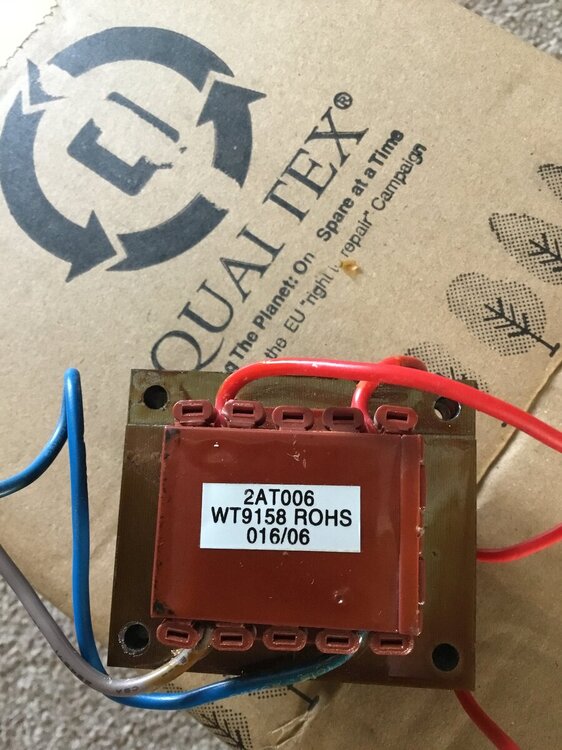
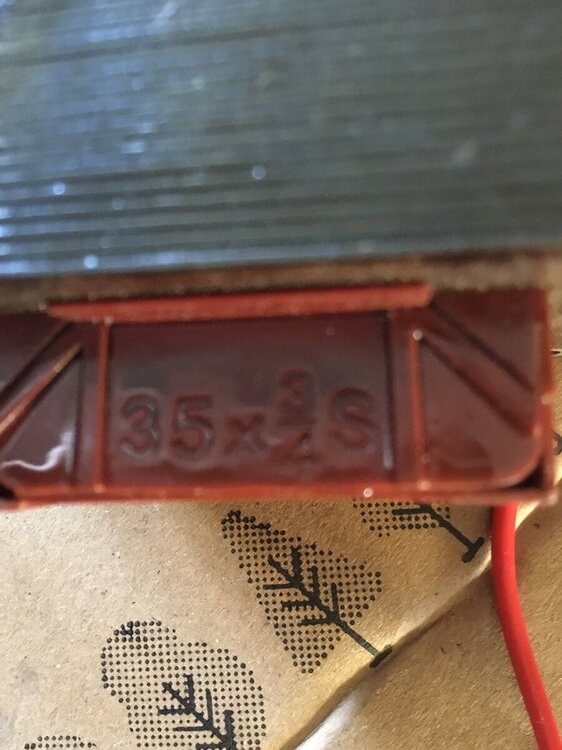
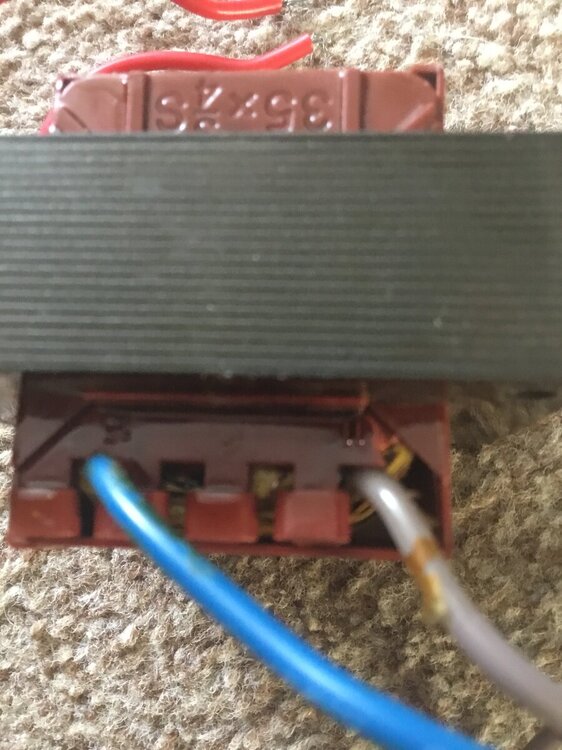
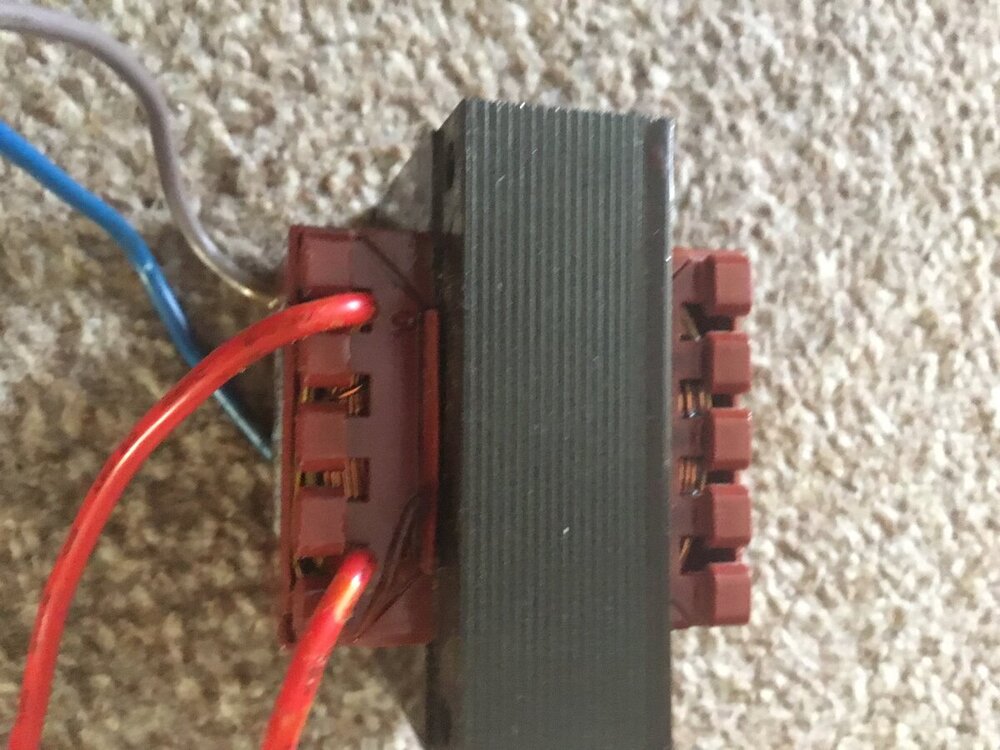
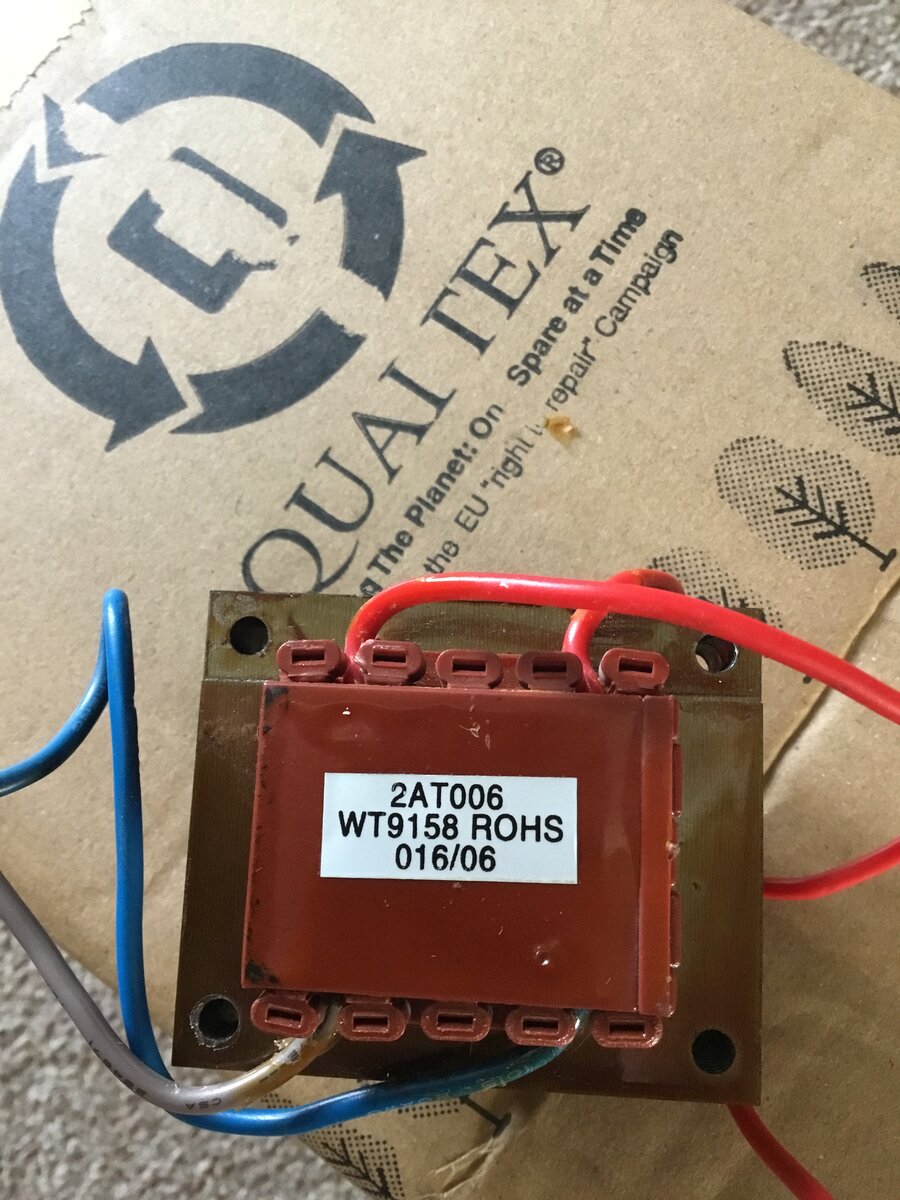
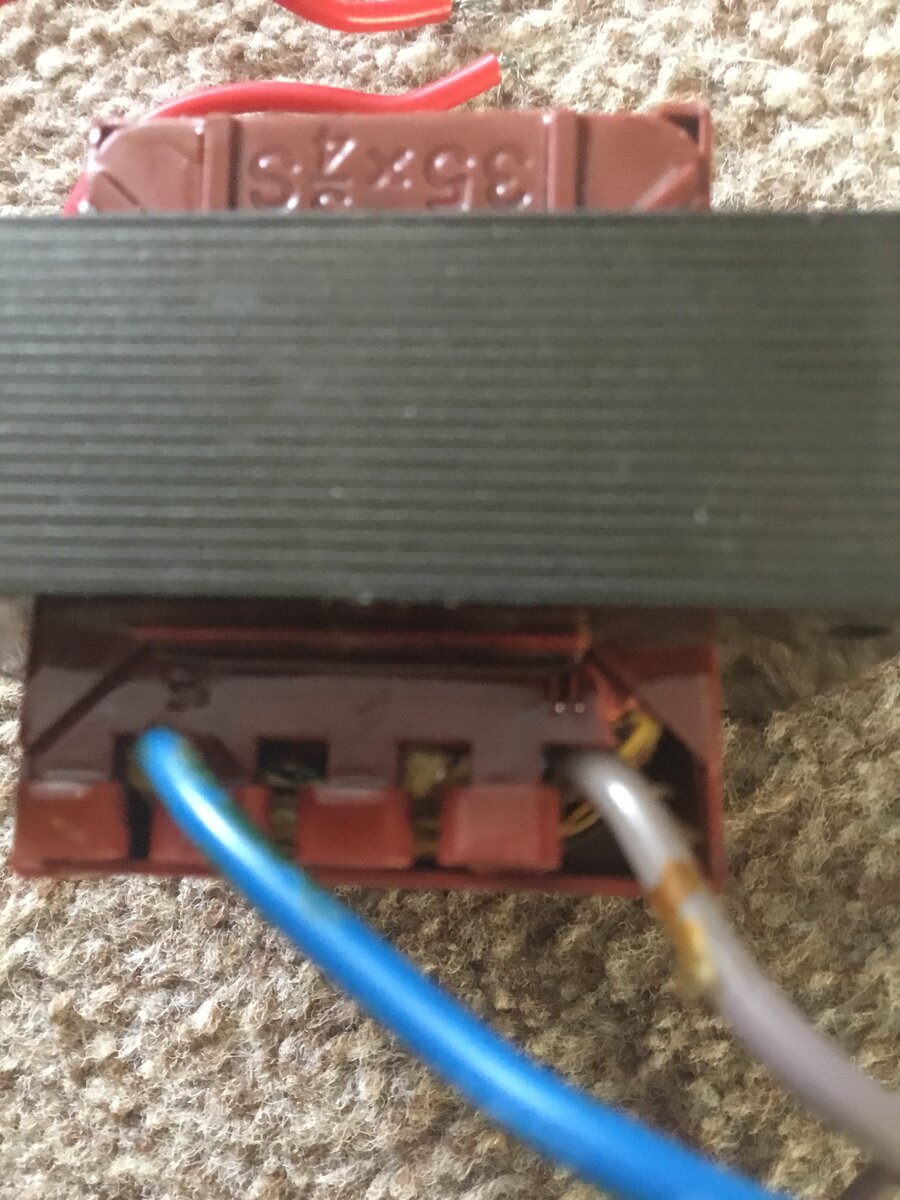
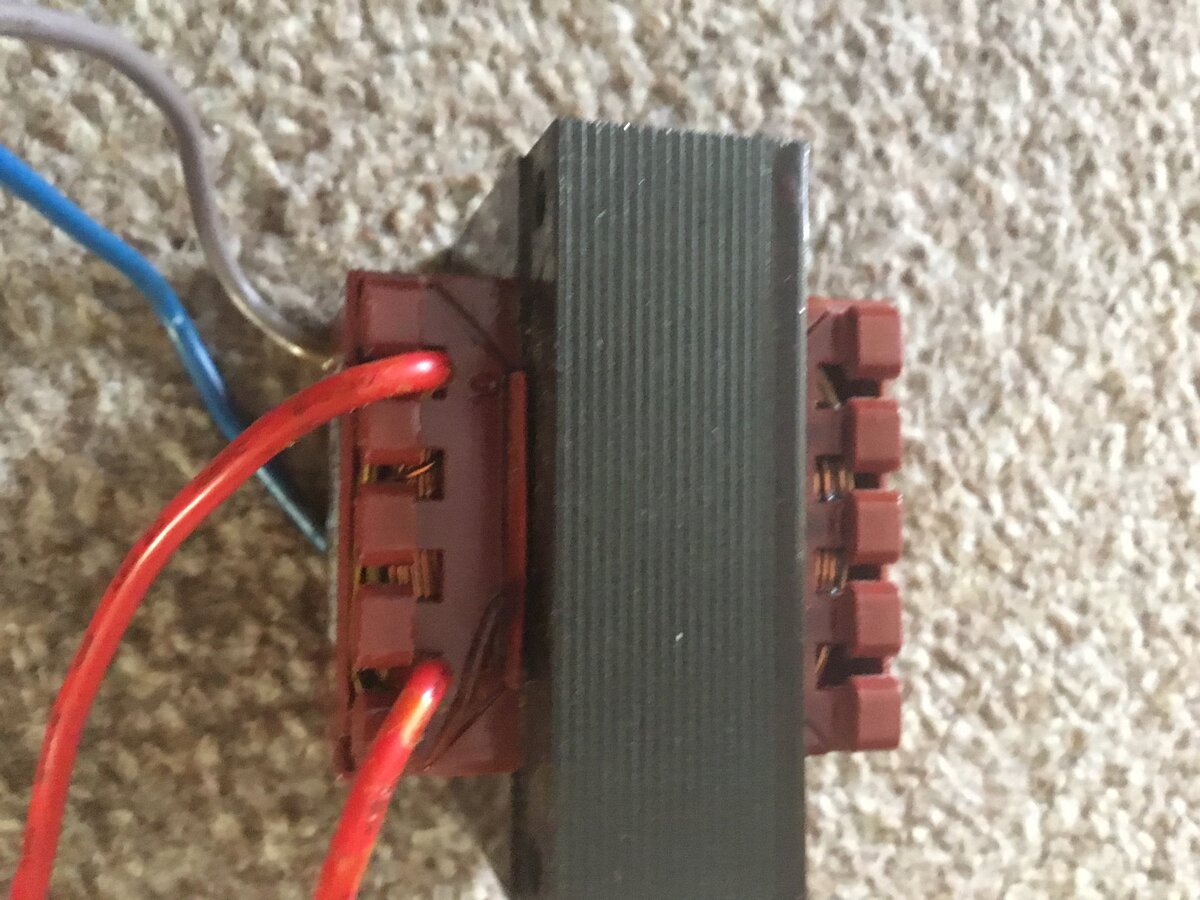
Hi I am looking for a compatibility transformer for a very old intruder alarm the control panel is a Avanti xp the transformer has blow the T250 fuse and smells of burning so needs replacing there is a label on it saying 2AT006. WT9158 ROHS. 016/06 it is square with no copper windings showing there are 4 cables two at one end and two at the other end two at one of the ends are blue and gray with blue one having number 15 next to the terminal and the gray one having the number 11 next to the terminal at the other end there is two red cables one of the red cables has the number 10 next to the terminal the other red cable I can’t see any number next to the terminal also the windings are in-capitulated on one the side of the transformer is printed 35x three quarters with the letter S at the end the transformer is for a Avanti xp intruder alarm can anyone give any information that will help me get a replacement please I have enclosed photos
-
FlamerUK joined the community
-
Im sorry i dont understand the question, do you mean connect to an existing or do you mean contact and a keypad?
-
Elmdene Grade 2 Flush Contact (Red Resistors) [Elm-QFT(RD)] - £3.69 : , Best Price Promise
-
Sadly we cannot list how to disable an alarm system on a public support forum for obvious reasons.
-
if you have one then es they are still in use with many companies when servicing
-
the test terminal is usually only requred on a grade 3 system? What sensor do you currently have a photo of the sensor will help us identify it
-
The galaxy would do all that you need, then you will need the detectors etc as required, sounders and an IP module. However it seems you might be better off with a polled comms platform ie dualcom. Decting powerloss is programmable but switching over onto ups would require a ups with a clean output to connect to a circuit on the galaxy
-
I need to replace a PIR motion detector for my home alarm system. The sensor that needs replaced has 7 terminals at the top of the circuit board. They are: 12v power +/-, Alarm NC x2, Test x1, Tamper NC x2. Do you sell a detector with the same connections? I tried a Pyronix MeQBlue but it only has 6 terminals (no Test terminal) and also the terminals are at the bottom of the board and not the top ( the cable length and positioning are quite limited). Thanks for your help!
-
I'm setting up sensitive material outside my organization in a UK military environment in Portsmouth and we need a small alarm system with the following features : - small factor - covering a 20sqm room - ability to set it up ourselves. - volumetric detection - door opening detection - no wifi - alarm reporting via Internet app, over wired Ethernet - optional : alarm reporting through 4G/5G internet that can be deactivated or disabled. - optional : notice upon power loss or notice upon switching to UPS. - ability to deliver the system rapidly within a few days. I was thinking about something along the Honeywell Galaxy Flex range but other options would be acceptable. Do you have such a system, and would it be possible to purchase from you ?
-
Risco Vitron Glass Break Detector Tester https://www.securitywarehouse.co.uk/catalog/intruder-alarm-equipment-c-36/misc-detectors-c-36_84/risco-vitron-glass-break-detector-tester-p-1452.html ------------------------------------------------------ Have one of these in the garage, can it still be used ?












Forum Statistics
- Total Topics 3.3k
- Total Posts 7.9k
Who's Online (See full list)
- There are no registered users currently online
Member Statistics
- 27,280 Total Members
- 707 Most Online
-
safesolution Newest Member ·