
Skip to content
View in the app

A better way to browse. Learn more.

Security Warehouse Support Forum

A full-screen app on your home screen with push notifications, badges and more.

To install this app on iOS and iPadOS
  1. Tap the Share icon in Safari
  2. Scroll the menu and tap Add to Home Screen.
  3. Tap Add in the top-right corner.
To install this app on Android
  1. Tap the 3-dot menu (⋮) in the top-right corner of the browser.
  2. Tap Add to Home screen or Install app.
  3. Confirm by tapping Install.

SMJH

Members
  • Joined

  • Last visited

Everything posted by SMJH

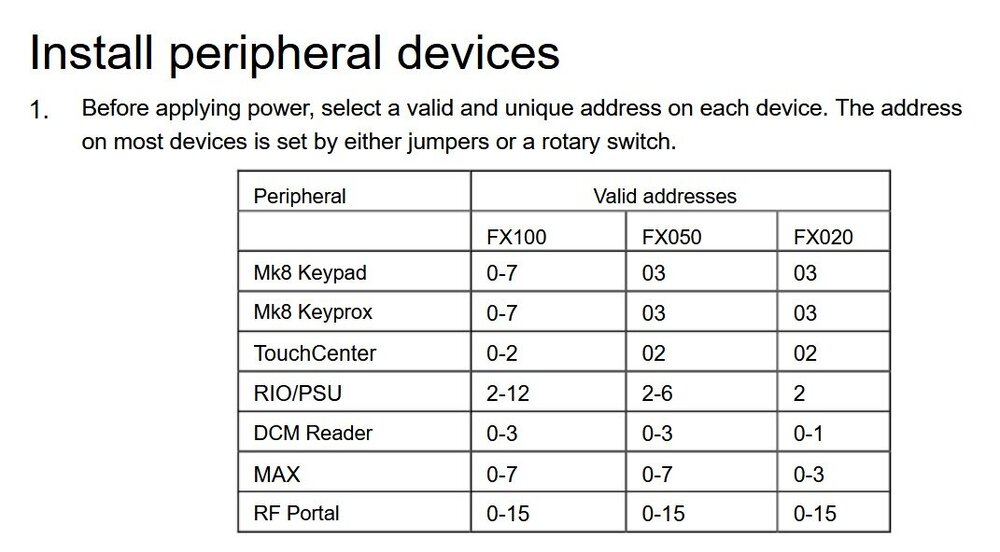
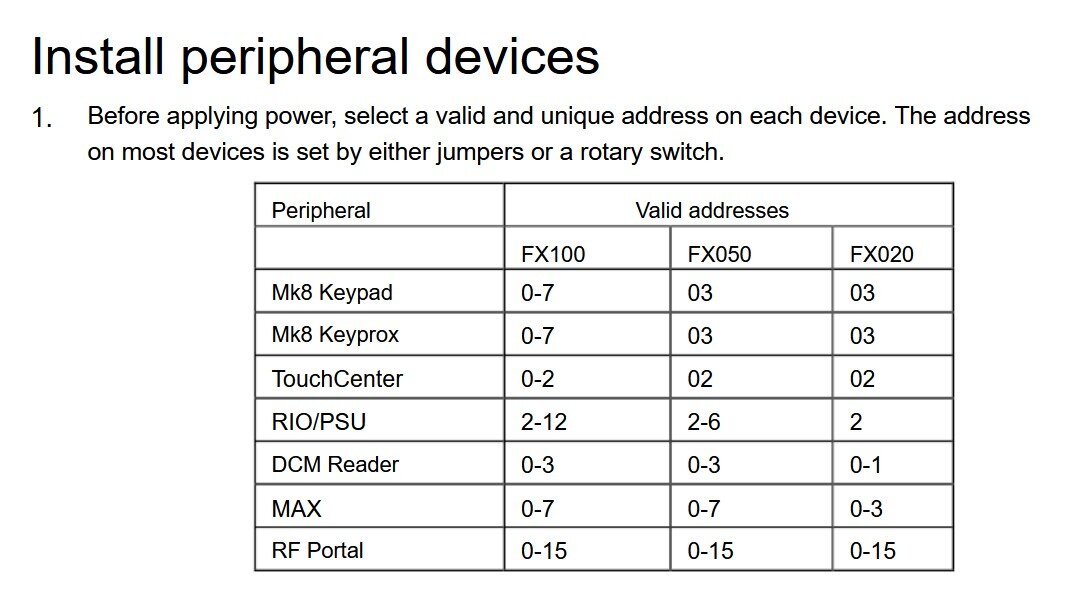
  1. I see there are several versions of the ethernet module floating about for the Honeywell panels. I have a Flex FX020 panel and the product code I can see inside the panel is C003-M-E2 v1.15 I simply want to use the GX app on my Android phone to be able to set, unset and reset the alarm remotely and also be able to enter the Engineer menus (I hold the engineer code as well as one of the user codes) IN a related question am I right in thinking that the wired RIO when used on a FX 020 has to use code 2 on the RS485 bus, my 1st and 2nd keypads currently use code 0 and 1 respectively. I should thus be able to add a 3rd keypad set to code 3? The code table in the installation manual appears to be missing a dash as it says 03 rather than 0-3 for the FX020 panel.
Account

Navigation

Search

Search

Configure browser push notifications

Chrome (Android)
  1. Tap the lock icon next to the address bar.
  2. Tap Permissions → Notifications.
  3. Adjust your preference.
Chrome (Desktop)
  1. Click the padlock icon in the address bar.
  2. Select Site settings.
  3. Find Notifications and adjust your preference.